Native Mac app · 100% Swift output
Updated:Thorous – AI iOS App Builder
for Native SwiftUI Apps
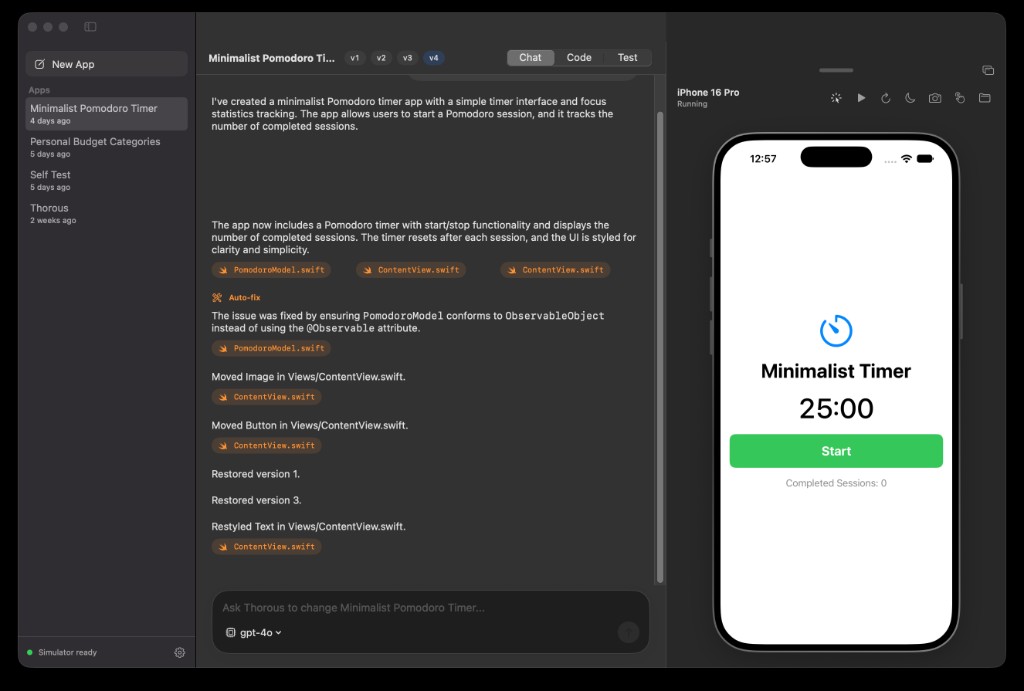
Thorous is an AI iOS app builder for Mac that turns plain-English prompts into native SwiftUI iPhone apps. It writes Swift code, compiles it, and runs it live in a built-in iPhone preview. Unlike generic AI builders, you can edit UI elements directly on the preview, and every change is written back to your code.
macOS 14 Sonoma or later · Apple silicon or Intel · Xcode installed
Features
What features power Thorous from idea to running app?
Prompt to running app
Describe what you want in plain English. Thorous writes the SwiftUI code, builds it and launches it in seconds.
Live iPhone preview
A real iOS Simulator runs quietly in the background and streams into a phone frame beside your chat, refreshing as your app changes.
Edit right on the screen
Switch to edit mode, then drag, reorder, recolor, retype or delete elements on the phone. Every change is written back to your Swift source.
Fixes its own build errors
If the compiler complains, Thorous reads the errors and repairs the code automatically before you ever see a red screen.
Your AI, your choice
Bring your own key for Anthropic, OpenAI or OpenRouter and pick the model you like. Keys stay on your Mac.
No Xcode wrangling
First launch sets up the simulator and toolchain for you. No project files, schemes or signing screens to deal with.
Real, readable Swift
Everything Thorous generates is clean native SwiftUI you own. Browse every file and take the code anywhere.
Undo anything
Each prompt and visual edit is saved as a revision, so you can jump back to any earlier version of your app.
How does Thorous build and test real iPhone apps?
No mockups or browser simulations. Thorous runs Apple's real iOS compiler and simulator directly on your Mac, healing build errors and running quality tests automatically.
How does autonomous build self-healing resolve compiler errors?
When you ask Thorous to create or change an app, it writes clean SwiftUI source files. If the Apple Swift compiler raises any syntax discrepancy or deprecation warning, Thorous reads the compiler diagnostic and repairs the code automatically.
How do 12 automated quality tests guarantee crash-free apps?
Before you even test your app, Thorous executes a headless test battery in under 15 seconds. It verifies launch speeds, enforces Apple HIG touch target guidelines, and confirms crash resilience.
- ✓Instant Launch Speed: First screen rendered in under 0.7s.
- ✓Apple Touch Targets: Verifies buttons are at least 44×44 pt for easy tapping.
- ✓Safe Area Compliance: Guarantees controls avoid the status bar & home indicator.
- ✓Light & Dark Mode: Survives appearance switches without unreadable text contrast.
- ✓Crash Resilience: Runs continuously for 5 seconds and relaunches cleanly.
How it works
How does Thorous build iPhone apps without Xcode projects?
- 01
Install and connect
Drag Thorous into Applications. On first launch it sets up the iPhone simulator for you, then asks for your AI provider key.
- 02
Describe your app
Type what you want, like “a recipe box with photos and a shopping list”. Thorous writes the Swift files and builds them.
- 03
Refine it live
Keep chatting to add features, or drag and restyle elements directly on the phone. The preview updates after every change.
Pricing
How much does Thorous cost and what is included?
Pay monthly, or save 73% by paying yearly. AI usage is billed by your own provider.
Monthly
$14.99/month
Billed monthly. Cancel anytime.
Start monthly- Unlimited projects and generations
- Live iPhone preview with visual editing
- Automatic build-error fixing
- Anthropic, OpenAI and OpenRouter support
- Full revision history for every project
- All future updates while subscribed
Yearly
Save 73%$3.99/month
$47.88 billed once a year.
Start yearly- Unlimited projects and generations
- Live iPhone preview with visual editing
- Automatic build-error fixing
- Anthropic, OpenAI and OpenRouter support
- Full revision history for every project
- All future updates while subscribed
macOS 14 Sonoma or later · Apple silicon or Intel · Xcode installed
FAQ
Frequently Asked Questions: What should you know?
Do I need Xcode?
+
Xcode needs to be installed, since Apple only ships the iOS compiler and simulator with it. You never have to open it: Thorous sets everything up and drives it for you.
Do I need my own AI key?
+
Yes. Thorous works with your own Anthropic, OpenAI or OpenRouter key, so you choose the model and pay your provider directly for what you use. Keys are stored only on your Mac.
Which Macs are supported?
+
Any Mac with Apple silicon or Intel running macOS 14 Sonoma or later.
Can I publish the apps I build?
+
The code is yours. Thorous produces standard SwiftUI source files you can open in Xcode and ship to the App Store with your own Apple Developer account.
What's the difference between the plans?
+
Nothing but the price. Both include every feature. Yearly works out to $3.99 a month, billed as $47.88 once a year.
Can I cancel anytime?
+
Yes. Cancel whenever you like and you keep access until the end of the period you've paid for.
Something else? support@thorous.com